LHSSL State Tournament of Champions
2026 — Youngsville, LA/US
Entry Instructions
Registration procedures:
1. Select competing students, events, and partners (where applicable).
2. Verify each student's eligibility. You must enter the NAME of the LHSSL-sanctioned tournaments the student attended to be eligible to compete at the State Tournament. Debate entrants must have competed at two different tournaments in a debate event (not necessarily the event for which they are registering at state. For this purpose, Debate events are: Congress, LD, PF, and Policy). Speech entrants must have competed at two different tournaments in the event for which they are registering. Once a student is selected from the drop down menu and they are added, there is a screen with a section called "Qualification". Skip the boxes asking for "Results". If you provide qualifying tournament information AFTER saving initial entry, there is a small edit icon next to each contestant on your Entry page. Click that box to get back to the Qualifier box(es).
3. Enter "free entries". Every LHSSL-member school can enter up to FOUR (4) entries who have not met the eligibility requirement for the event in which they are registered. Coaches may use this to add an additional event for a student who is eligible in one event but not another. Coaches may also use this for students to compete at State who would otherwise be ineligible. For this purpose, team events (Duo, PF, Policy) are considered as 1 entry. Check the "at large" box below the list of qualifying tournaments to indicate a free entry.
4. Contestant Entry deadlines. Friday, March 20 at 3 pm. Nuisance fees begin on Tuesday, March 24, after 3 pm
5. Observe entry limits.
a. Students may enter only ONE event in the Debate/Duo pattern.
b. Students may enter up to TWO events in the Individual Speech Events pattern.
c. Students may enter Congress regardless of how many other events they have entered.
6. Enter selection information. Complete the required information for:
OO, Info, POI, OI, Prose, Poetry - Title
Dec, DI, HI, Duo - Title and Author/Speaker
Special note about OI: For "Title", enter the Prose title first, followed by a slash (/), and then followed by a title of the Poetry program. If multiple poems are used, enter the name of the poem that serves as the central theme of the program.
Note: At the State Tournament, a competitor MAY NOT perform the same selection in two or more events.
7. Enter Judge Names (Deadline: Thursday, March 26, at 12 pm)
a. Each judge MUST have a tabroom account, and their account must include their phone number on their profile. We will use emails, tabroom inbox messages, and browser notifications (if enabled) to alert judges that they have ballots. We may make phone calls and send texts as well. Judges should be expected to have a device with them at the tournament, as we anticipate using electronic balloting. Coaches are obligated to train their judges how to navigate the tabroom.com platform in order to access and submit their electronic ballots. Coaches also have an affirmative duty to TRAIN any new/lesser experienced judges about event rules, norms, and judging criteria, including providing appropriate and constructive written feedback on ballots.
b. Use the Judge Notes to indicate information the tab staff needs to properly place judges. For example, are there schools besides yours for which the judge is conflicted (e.g., used to teach there, graduated within the last 4 years)? You can also use the notes to tell us if there are certain events within the judge category for which the judge is better suited (e.g., Policy preferred, no interp). Do NOT use this for time restrictions (see step c). Update the Judge Notes as necessary.
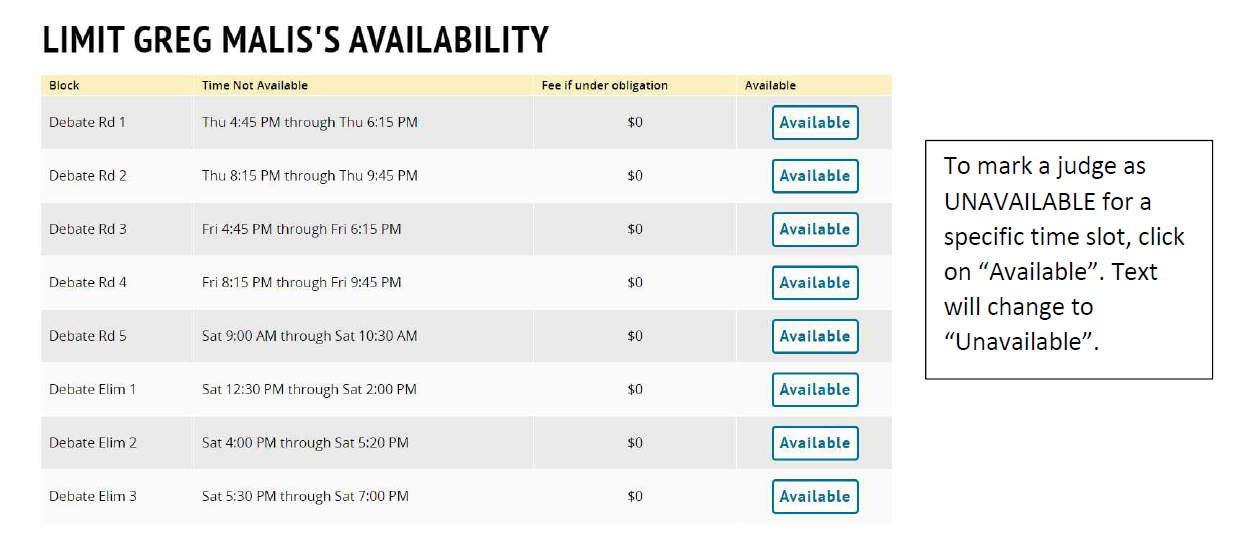
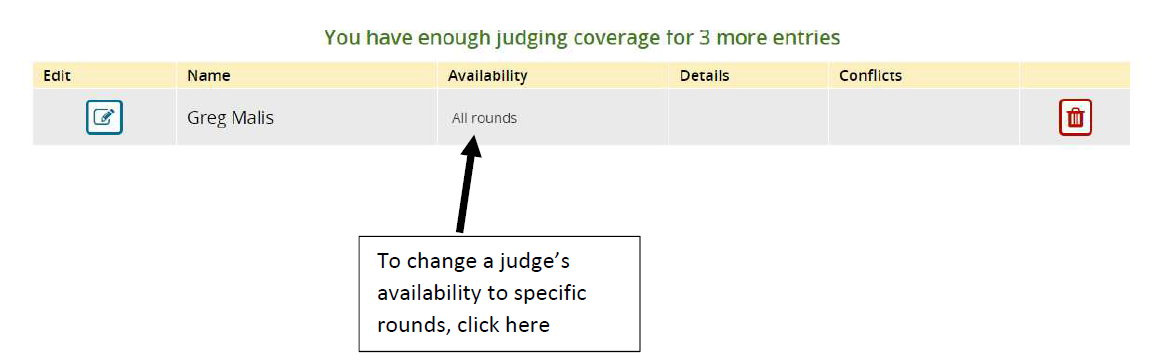
c. Indicate which rounds judges are available. [NOTE: Please hold off on this step until after we have an updated schedule. The times listed as of now may NOT be accurate. We will notify you when this part of the registration process is complete]. After step b is complete, click "Save Details". On the next screen, you will see the judges' names listed. Tabroom initially assumes that any judge listed is available for ALL rounds in the category. If that is false, please click on the words "all rounds" next to the judge name (located under the column marked "Availability" – see screen shot below). This will take you to a new screen that shows the tournament schedule for that category. If a judge is unavailable at a specific period of time, please click on the word "available" at the right (see screen shot below). This will label the judge as unavailable in that time slot. Select all slots for when the judge is unavailable. Update your judges' availability as more information is known.
Important note: the number of judges you owe for a judge category is the number of judges per time slot. If you owe 2 judges for debate, then that is 2 judges for EVERY preliminary round, and at least the first elimination round. You can have as many people as needed throughout the weekend to fulfill your per round obligation.
If you want to verify that you have entered a sufficient number of judges for EACH TIME SLOT of the tournament, please check your Fee page. Missing judge slots show up as a $1 fine for each missing slot. Please know that this is not an actual fee to be paid. In fact, we don't want you to pay the fee at all. We require that you find a judge to fill the missing slot.
d. Enter a rating for the judges in the various categories. Both Debate events and Speech events are subdivided into the different events. Tournament staff will use these rating to identify which events are better suited for the registered judges. However, these are only guides. Debate judges could end up judging any debate event, and Speech judges could end up judging any speech event.
e. School's judge obligation is one round past your school's elimination in that category. If no one from your school reaches the first full elimination round in individual events, then your school still must provide the required number of judges for the first elim. If at least one student breaks to first elim, then your school still must provide the required number of judges for the next elim. This means that ALL schools are required to provide the requisite number of judges for the first elimination rounds on Saturday EVEN IF NO ONE FROM THE SCHOOL ADVANCES TO ELIMS.
8. Wednesday registration procedures. At registration on Wednesday evening, each school must be represented. A coach (or an individual approved by the coach) must confirm the following:
a. Entry as shown in tabroom is correct. If not, tell us the changes (penalty fees may apply to drops)
b. School Consent Form has been downloaded, printed, signed by principal, and reuploaded to tabroom (directions are on the School Authorization Form subpage at the right)
c. Originals (hard copy or digital copy) of materials for memorized events (see main page for details). Coaches do not need to submit or upload these materials, but they should be available during the tournament upon request.
d. Payment (may be presented in-person on Wednesday evening) has been given to Executive Secretary.
Please click on additional pages on the right for more information. We will add pages as we get closer to the tournament (e.g., Extemp Topic Areas, Impromptu Topic Areas, Host Site Logistics, etc.).